I made 4 apps with ChatGPT’s Intelligent UI — it’s not ready for prime time
While I keep jumping between Gemini, Claude, and ChatGPT, Claude is my AI butler of choice. While the long-winded replies can be a chore, I like how visual and interactive Claude artifacts are. I’ve asked Claude to build interactive dashboards for my share portfolio, and I have a budgeting tool that I keep tinkering with. But these are big, clunky HTML pages, and you need a $20 subscription (either Claude Pro or…
Affiliate links on Android Authority may earn us a commission. Learn more.
I made 4 apps with ChatGPT's Intelligent UI — it's not ready for prime time
Nov 2, 2026 — 6:00 AM ET
While I keep jumping between Gemini, Claude, and ChatGPT, Claude is my AI butler of choice. While the long-winded replies can be a chore, I like how visual and interactive Claude artifacts are. I’ve asked Claude to build interactive dashboards for my share portfolio, and I have a budgeting tool that I keep tinkering with. But these are big, clunky HTML pages, and you need a $20 subscription (either Claude Pro or ChatGPT Plus).
Just a fancy way to show you the same answers? Or can it replace some of your smaller apps?
So, when ChatGPT 6 came out with Intelligent UI, I was intrigued. It’s free for everyone, and it’s directly integrated into the Chat mode. ChatGPT is trying to do something it has historically struggled with: generating interactive interfaces right in the chat. Responses that go way beyond just a wall of text.
But what is it exactly? Just a fancy way to show you the same answers? Or can it replace some of your smaller utilities or apps? I tried to find out.
Could you see yourself replacing some of your apps with ChatGPT's Intelligent UI?
I started with an F1 mini app that wasn’t
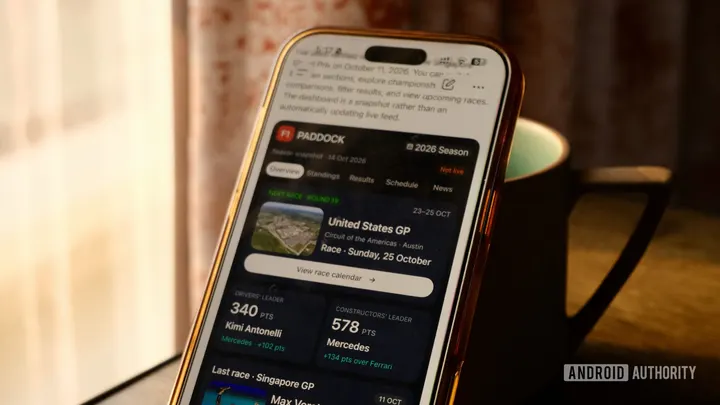
I’m the kind of F1 enthusiast who watches the highlights and funny F1 coverage on YouTube. We all need hobbies. I also use F1 apps and websites to keep up with updates, scores, and standings. So I thought, why not ask ChatGPT to create an F1 app for me.
It did. Kind of. It presented me with a sleek-looking F1 mini app that showed me the schedule, upcoming race, and even some news. But it just felt incomplete. To see the full schedule, I’d need to open the official website. To see the driver standings beyond the top three? Back to the website.
ChatGPT's mini apps don't autoupdate.
The best part was the small text at the end: This is not an auto-updating app, so come next week I’ll need to run the prompt again. The illusion was already starting to fall apart. These aren’t exactly mini apps then. F1 apps and real mobile app developers are safe, at least for now.
Who doesn’t want a nice clean bill splitter?
This is one of the examples that OpenAI highlighted, and it’s a good one. ChatGPT generates a very nice, clean bill splitter in a couple of seconds. You can add a tip, choose the number of people, and even select a custom split if one friend is feeling generous.
This one went quite well. But who is it really for? A bill splitter function is table stakes for AI at this point. Even Siri AI has a feature where you can take a photo of a bill, choose what you had, and pay just for that part. But for people who don’t want to use Apple Cash or ad-riddled apps, this can be a viable alternative.
The dream of a brewing companion lives on
Every morning, I brew either an AeroPress or a pour-over coffee depending on my mood (sometimes both). Most of the time, I have a set recipe I work with, but sometimes a coffee bean throws everything off. If I get a highly processed or fermented Colombian coffee, my everyday coffee rules won’t apply. I usually ask Claude or Gemini to create a recipe for me by uploading a photo of the coffee.
ChatGPT offered to build a whole brewing companion for me, and it is quite impressive at first glance. I have preset options based on the coffee, and I can manually adjust the variables as well. There’s a Journal feature where I can record my tasting notes and experiences as well.
But it just doesn’t work. The timer won’t work even after rebuilding the whole thing.
But it just doesn’t work. The timer won’t work even after rebuilding the whole thing. The journal entries, while easy to enter, are saved only in the current interactive session.
What I liked about the Brew Lab experiment was the visual calculator and recipe steps. I can see myself asking ChatGPT to make a one-off recipe guide for a coffee. The visual guide here actually is helpful. But as an app where I store data or presets, where I come back to journal notes, that’s just way off. I’d rather use dedicated apps like BrewLog (or spend some time vibe-coding a custom tool for myself).
An interactive trip planner is quite useful
I’m sure you’ve used Gemini to plan your trips. Usually, you’re met with a wall of text, bullet points, some photos, and links. With the new Intelligent UI feature, ChatGPT breaks things down into interactive chunks.
When I asked ChatGPT to plan a food-focused three-day trip to Goa, it got back to me with three tabs to explore, plus some refining questions. For each day, I get a timetable, with details about the place, what to order, and a nice checkmark to mark my activity.
What I liked about the interactive tool is the question-and-answer round. ChatGPT asked me which areas I wanted to visit and what activities I wanted to do, and it came back with a refined itinerary and even offered a budgeting tool for two people, which I found very useful.
What really is intelligence?
The question that plagues the AI industry carries on with ChatGPT 6’s Intelligent UI feature. What really is intelligence? A more realistic name would be Interactive Answers. ChatGPT now finally does a good job of organizing text-heavy and dense information in an interactive format. Yes, it’s mostly tabs, tables, and questions, but it does help.
If you go in with that expectation, you’ll find Intelligent UI useful. But it’s not really an “intelligent” interface, nor is it close to being a mini-app replacement. A big part of what makes an app useful is its built-in memory, object permanence, and reliability. ChatGPT’s interactive UI can’t store data beyond the session, and there is no single repository where you can access all your mini apps quickly and easily.
While I can definitely see myself asking ChatGPT to create a custom recipe for a pour-over coffee, and to whip up a quick bill splitter, I believe the developers can take a breath.
ChatGPT is clearly trying to build interfaces, but it’s not nearly ready to replace the apps that I use daily, even simple ones for tracking travel details, and yes, F1 results. Let alone something using something complex like a Notion database for planning and research. If you’re curious about how ChatGPT is finally embracing interfaces beyond just a wall of text, ask it to whip up a simple tool now and again, but don’t try to replace your existing mobile apps — unless you just have a Saturday afternoon to kill.