بررسی کیس گیمینگ HyperX Omen 35L: قدرتمند، زیبا و گرانقیمت
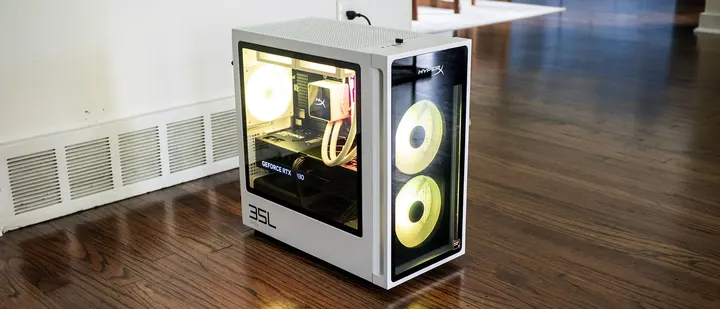
کیس گیمینگ HyperX Omen 35L شرکت HP با سختافزار ردهبالا از جمله پردازنده Ryzen 9 9950X3D و کارت گرافیک Nvidia RTX 5080 عملکردی خیرهکننده در اجرای بازیها و کارهای سنگین ارائه میدهد. این سیستم با طراحی شیک سیاه و سفید و اجزای باکیفیت خود توجه علاقهمندان را جلب میکند، اما قیمت بسیار بالای آن چالشبرانگیز است.
شرکت HP با عرضه کیس گیمینگ HyperX Omen 35L تلاشی تازه برای جذب گیمرهای حرفهای و علاقهمندان به سختافزار انجام داده است. این سیستم در بالاترین پیکربندی خود با پردازنده AMD Ryzen 9 9950X3D، ۶۴ گیگابایت حافظه رم و کارت گرافیک انویدیا مدل RTX 5080 تجهیز شده است که ترکیبی ایدهآل برای اجرای بازیها در رزولوشن 4K به شمار میرود. طراحی این کیس با ترکیب رنگهای سیاه و سفید، استفاده از پنلهای شیشهای حرارتدیده و نورپردازی گسترده RGB، ظاهری مدرن و جذاب به آن بخشیده است.
در بخش امکانات و ارتقاپذیری، این کیس از قطعات استاندارد بهره میبرد و دسترسی به اجزای داخلی نسبتاً آسان است. از جمله ویژگیهای مثبت آن میتوان به سیستم خنککننده مایع استاندارد با یک پنل LCD روی بلوک پردازنده برای نمایش دما، منبع تغذیه کاملاً ماژولار و پورتهای ارتباطی متنوع اشاره کرد. با این حال، عدم پشتیبانی از پورتهای USB4 یا Thunderbolt 4 در سیستمی با این رده قیمتی کمی ناامیدکننده است، هرچند که حضور وایفای ۷ و بلوتوث ۶ تا حدی این کمبود را جبران میکند.
تستهای انجامشده روی این مدل نشان میدهد که پردازنده و کارت گرافیک در اجرای بازیهای سنگین با رزولوشن 4K عملکرد پایدار و روانی دارند. در بنچمارکهای مختلف، این سیستم پایداری خود را در جلسات طولانی بازی حفظ کرده و در بخش پردازش و کارهای سنگین نیز پابهپای رقبا ظاهر شده است. نرمافزار مدیریت Omen Gaming Hub امکانات زیادی برای کنترل سرعت فنها، تنظیمات پیشرفته پردازنده و شخصیسازی نمایشگر LCD و نورپردازی فراهم میکند.
با تمام ویژگیهای ممتازی که HyperX Omen 35L ارائه میدهد، قیمت پایه ۶,۲۱۱ دلاری نسخه بررسیشده نشان میدهد که این دستگاه تنها برای افرادی با بودجههای کلان و علاقهمند به سختافزارهای ردهبالا طراحی شده است. مدلهای ارزانتر این سری نیز با توجه به سختافزار پایهای که ارائه میدهند، ارزش خرید کمتری دارند و این سیستم بیشتر ویترین توانمندیهای HP در بازار رایانههای آماده است.
HyperX Omen 35L review: A polished gaming PC for deep pockets
HP’s HyperX Omen 35L is ambitious, and it’s hard not to be impressed by it in our maxed-out test guise with a Ryzen 9 9950X3D and Nvidia RTX 5080. From its monochrome design and extensive RGB lighting to its top-tier components, it checks the boxes enthusiasts are looking for. But when a PC is $6,211 like our test configuration, it raises the question of whether the Omen 35L’s blend of style, performance, and…
Tom's Hardware Verdict
The HyperX Omen 35L delivers a premium gaming PC experience, pairing a striking black-and-white styling, quiet operation, enthusiast-grade features, and excellent 4K gaming performance. Top-end configurations make the most sense, as entry-level models are expensive for the hardware.
Reasons to buy
- + Impressive gaming performance
- + Sharp black-and-white case
- + Standard liquid cooling
- + Quiet operation
- + Fully modular power supply
Reasons to avoid
- - Steep starting price
- - No USB4/Thunderbolt 4 ports
Why you can trust Tom's Hardware
Our expert reviewers spend hours testing and comparing products and services so you can choose the best for you. Find out more about how we test.
HP’s HyperX Omen 35L is ambitious, and it’s hard not to be impressed by it in our maxed-out test guise with a Ryzen 9 9950X3D and Nvidia RTX 5080. From its monochrome design and extensive RGB lighting to its top-tier components, it checks the boxes enthusiasts are looking for.
But when a PC is $6,211 like our test configuration, it raises the question of whether the Omen 35L’s blend of style, performance, and premium features is enough to justify a purchase, even if that's what high-end PCs cost right now.
Design of the HyperX Omen 35L
The HyperX Omen 35L’s black and white case stands out, looking refreshingly modern, even though parent company HP has used similar designs before. At 8.27 by 16.06 by 16.14 inches, it’s firmly in mid-tower territory. The metal case feels reassuringly solid and makes extensive use of tempered glass. Bright RGB fans shine through the front while many RGB-lit components are visible through the side panel. It’s a classy system.
The contrast continues inside, where the black motherboard, graphics card, and power supply are easily visible against the white case. The white liquid cooling loops are especially attractive, as is the CPU cooler featuring its own LCD panel. The latter shows CPU and GPU temperatures.
HyperX Omen 35L Specifications
Ports and Upgradeability on the HyperX Omen 35L
HyperX’s top-mounted front ports include USB-C (10 Gbps), two USB-A (5 Gbps), and an audio combo jack. This location works well if the desktop is on the floor.
At the back, the tower offers a pair of USB-C ports (10 Gbps), two USB-A (5 Gbps), four USB 2.0, DisplayPort 1.4 output, Ethernet, and audio jacks. It’s disappointing to see a desktop this expensive offers neither USB4 nor Thunderbolt 4, though it does include Wi-iFi 7 and Bluetooth 6.0 from a Realtek 8922AE networking card. The wireless antennas are built into the chassis, eliminating the need for external protrusions. It’s also notable that HP offers a Clear CMOS button, a surprise on a mainstream tower.
The HyperX Omen 35L offers about as much upgradeability as expected from a mid-tower, without proprietary parts. Its side doors are secured with thumbscrews; the slide rearward and away. The mATX-style motherboard offers four DDR5 DIMM slots, populated in our review unit with two 32GB RGB HyperX modules running at 6,000 MHz.
Get Tom's Hardware's best news and in-depth reviews, straight to your inbox.
The system also supports two M.2 2280 drives. The primary slot is covered in a substantial heatsink just above the RTX 5080. Accessing the other slot requires removing the RTX 5080. The card is secured with five screws, two of which hold it to the front support bracket. Deft fingers are required to reinstall the screws at the back of the card.
HP’s wiring work is tidy for a mainstream tower. Sleeved cables would have improved the refinement. On the plus side, HP includes a fully modular power supply, an uncommon feature in big box systems.
Gaming and Graphics on the HyperX Omen 35L
We tested the HyperX Omen 35L in a maxed-out configuration featuring a Ryzen 9 9950X3D processor, 64GB of RAM, and a GeForce RTX 5080.
I fired up 007 First Light to test out this system’s prowess. At a 3840 x 2160 resolution with high settings and post effects enabled, I saw up to 120 frames per second (fps) indoors and in the mid-90 fps range in more complex scenes without DLSS. The game never stuttered and remained supremely playable.
The systems we’re using for comparison include a pair of RTX 5090 towers, the Alienware Area-51 (Ryzen 9950X3D, $5,749.99 when tested, $8,899.99 as of this writing) and the Maingear MG-1 (Ryzen 9 9950X3D2, $7,067 when tested, $9,076 as of this writing), plus Corsair’s Vengeance a7500 powered by a Ryzen 7 9800X3D and an RTX 5070 Ti ($2,799.99 when tested, $3,299.99 as of this writing). With its RTX 5080, the HyperX desktop ought to slot in the middle of this group.
View Original
View Original
View Original
View Original
View Original
View Original
The HyperX desktop performed as expected given its RTX 5080. That said, the 1080p numbers show significant variance from system to system. In Shadow of the Tomb Raider (Highest detail preset), the HyperX produced 300 fps to outperform even the Alienware (248 fps), though it couldn’t catch the Maingear (355 fps). In other instances, even the RTX 5070-powered Corsair was able to pull ahead as seen in Far Cry 6 (Ultra settings), where it produced 197 fps against the HyperX’s 141 fps.
But these desktops are designed for 4K play. At that resolution, the HyperX’s RTX 5080 produced admirable numbers. Naturally, it wasn’t in the same league as the RTX 5090 systems; in Red Dead Redemption 2 (Medium settings), the HyperX produced 83 fps against the Alienware’s 122 fps and the Maingear’s 121 fps, and in Borderlands 3 (Badass settings), the HyperX landed at 115 fps against Alienware’s 166 fps and Maingear’s 186 fps. The differences narrowed in Far Cry 6, with the HyperX producing 118 fps to Alienware’s 128 fps. The largest deltas were seen in Cyberpunk 2077 (Ray Tracing Ultra preset), where the HyperX produced 36 fps, well ahead of the Corsair’s 29 fps, but significantly behind the Alienware’s 55 fps. Overall, though, this HyperX desktop is well-suited to 4K play.
We stress-test gaming desktops running 15 loops of the Metro Exodus benchmark at RTX settings, simulating about half an hour of gameplay. During the test, the HyperX desktop averaged 172.21 fps across all runs with a sub-one fps variance, indicating stable performance. During the test, the Ryzen 9 9950X3D averaged 4.79 GHz and 48 degrees Celsius while the RTX 5080 ran at 2.74 GHz and 50 C.
Productivity Performance on the HyperX Omen 35L
Our HyperX test unit features a Ryzen 9 9950X3D processor, 64GB of RAM, and two 1TB PCIe 5.0 drives running separately, one hosting the OS andthe other for storage.
Featuring the same Ryzen 9 9950X3D processor, the HyperX and Alienware systems performed similarly across our CPU tests. In Geekbench 6, the HyperX system produced 19,923 points against Alienware’s 20,411 points, though it was handily outperformed by the Ryzen 9 9950X3D2-powered Maingear, at 23,741 points. With fewer cores, the Ryzen 7 9800X3D-powered Corsair finished last, at 18,124 points.
The HyperX desktop finished our Handbrake 4K-to-1080p video transcoding test in 1 minute and 47 seconds, tying the Alienware, though the Maingear edged ahead, at 1:32. The Corsair took nearly twice as long, at 3:02.
In our 25GB file transfer test, the HyperX’s average transfer speed of 3,197.42 MBps was excellent, just behind Alienware’s 3,414.29 MBps and ahead of the Corsair’s 2,659.94 MBps and Maingear’s 2,782.43 MBps.
Software and Warranty on the HyperX Omen 35L
HP includes several useful apps. Omen Gaming Hub app provides performance control, with per-fan RPM settings and, in Extreme mode, PPT and EDC settings for the Ryzen 9 CPU. The Advanced Performance Tuning section also provides PBO, CPU Boost, and voltage curve controls plus a benchmark to test your settings. For quick access, the app provides an overlay that shows your power profiles and system monitoring, including component temperatures and fan speeds.
Gaming Hub also provides customization of the LCD display on the liquid cooler. Many faces are available, from system monitoring to static images, GIFs, videos, and a clock. It seems simple, but it’s one of the most fun features of the system, allowing you to easily change up the look.
Lighting is managed through Omen Light Studio, which provides per-device RGB control. Fine control is possible – each of the five fans has 10 LEDs, which are individually selectable. Clicking and dragging selects multiple fans and LEDs at a time, to which you can apply preconfigured light recipes – Galaxy, Ocean, Jungle, Volcano, and Omen – and apply an effect, such as wave, static, ambient, breathing, color cycle, an audio visualizer, and radial. The speed and direction of the effect is also configurable. You can also create layered effects and save everything in profiles that you can export or import. HP covers the HyperX Omen 35L with a standard one-year warranty.
HyperX Omen 35L Configurations
We tested the HyperX Omen 35L with a Ryzen 9 9950X3D processor, 64GB of dual-channel DDR5-6000 RAM, GeForce RTX 5080 graphics, Windows 11 Pro, and two 1TB PCIe 5.0 solid-state drives. The system uses a 1,000W power supply and a 240 mm liquid CPU cooling with a built-in LCD display. This configuration represents the top of the stack, retailing for $6,210.98.
The entry-level is probably where the Omen 35L offers the least value – with standard liquid cooling and a modular power supply, this system is for premium builds. AMD-based starter configurations begin at $2,399.99 with a Ryzen 5 9600X or $2,589.99 with an Intel Core Ultra 5 250KF Plus. Standard components include a GeForce RTX 5060 Ti (8GB), 16GB of memory, and 1TB of PCIe 4.0 storage. Memory tops out at 128GB and two SSDs are supported up to 2TB each.
Bottom Line
Primarily, the HyperX Omen 35L gets one thing right: it feels genuinely premium. Its sharp black-and-white design, quality lighting, quiet operation, and enthusiast-grade components like a modular power supply give it the polish it needs to compete against boutique builders and aftermarket systems. Its performance in our test system with a Ryzen 9 9950X3D and an RTX 5080 match the expectations for this lofty price point.
That said, it’s clear that this desktop is aimed at the more premium side of the market, as prices of the entry-level configurations are difficult to justify given their level of hardware. But if you have deep enough pockets for a well-equipped configuration, the HyperX Omen 35L is a highly compelling gaming desktop well worth considering alongside anything the market has to offer.
Charles Jefferies is a freelance reviewer for Tom’s Hardware US. He covers laptop and desktop PCs, especially gaming models.
Source report: Tom's Hardware.
گزارش فارسی این خبر با کمک هوش مصنوعی و فقط بر اساس اطلاعات منتشرشده در منبع تهیه شده است.