ابزار جدید برای طراحی پوسته موس گیمینگ بدون نیاز به هوش مصنوعی
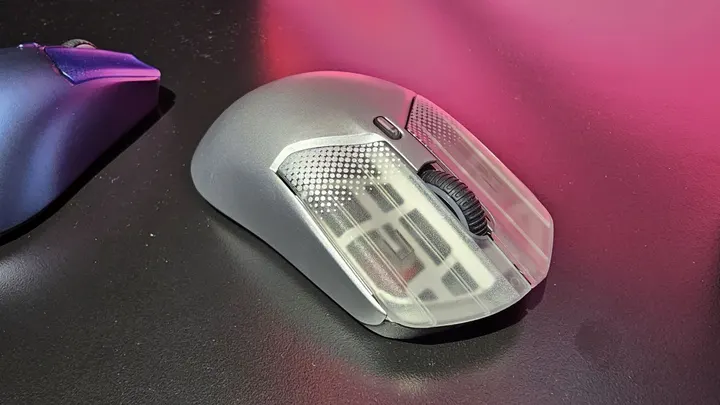
بستیان رشا، مفسر سابق ورزشهای الکترونیک، ابزاری به نام Mausstudio ساخته است که امکان طراحی و سفارشیسازی پوستههای موسهای سهبعدی را بدون اتکا به هوش مصنوعی فراهم میکند. این نرمافزار به صورت محلی اجرا شده و مکان دکمهها، محل سنسورها و پیچها را به طور خودکار شناسایی میکند.
بستیان رشا، مفسر سابق بازی CS:GO و از علاقهمندان به چاپ سهبعدی، پروژهای جدید به نام Mausstudio را معرفی کرده است که به کاربران اجازه میدهد پوستههای سفارشی برای موسهای گیمینگ طراحی کنند بدون اینکه نیازی به دانش نرمافزارهای CAD داشته باشند. این ابزار که به صورت محلی اجرا میشود، بر پایه هوش مصنوعی کار نمیکند و تنها بر مبنای ریاضیات و الگوریتمها توسعه یافته است.
بر اساس دموهای منتشرشده، نرمافزار Mausstudio با وارد کردن فایل سهبعدی PCB موس کار میکند و به طور خودکار مکان قطعات کلیدی مانند سویچ دکمهها، محل سنسور، چرخ اسکرول و سوراخهای پیچ را تشخیص میدهد. سپس پوستهای متناسب با این اجزا تولید کرده و پایههای لازم برای سویچها و برشهای مورد نیاز را ایجاد میکند. کاربران همچنین میتوانند ابعاد مختلف موس از جمله طول، عرض، ارتفاع و محل قرارگیری باتری را به دلخواه تنظیم کنند.
این ابزار برای علاقهمندان به ساخت موسهای سفارشی که میخواهند فرمهای گوناگون را با هزینه کمتری آزمایش کنند بسیار کاربردی است. بستیان رشا هنوز تاریخ انتشار رسمی یا مدل قیمتگذاری این پروژه را اعلام نکرده است، اما بهروزرسانیهای مداومی را برای بهبود کارایی، ذخیره طرحها و پشتیبانی از هندسههای تمیزتر روی آن اعمال میکند.
Former esports commentator builds his own custom mouse shell generator for 3D printing that doesn’t use AI — Mausstudio automatically detects buttons, screwholes, and sensor locations
Bastian Recha, “Unskilledcast,” is a German former CS:GO commentator, tech reviewer, and 3D printing enthusiast. On October 28, he posted a demo of his “Mausstudio” project on X that generates a customizable mouse shell around an imported 3D model of a mouse PCB intended for 3D printing — all running locally and not generated using AI. Bastian posted on X after six days of inactivity, stating that he’s been busy…
Former esports commentator builds his own custom mouse shell generator for 3D printing that doesn’t use AI — Mausstudio automatically detects buttons, screwholes, and sensor locations
Mausstudio lets you design a 3D-printable gaming mouse shell without learning CAD.
Bastian Recha, “Unskilledcast,” is a German former CS:GO commentator, tech reviewer, and 3D printing enthusiast. On October 28, he posted a demo of his “Mausstudio” project on X that generates a customizable mouse shell around an imported 3D model of a mouse PCB intended for 3D printing — all running locally and not generated using AI.
Bastian posted on X after six days of inactivity, stating that he’s been busy working on Mausstudio, his custom 3D-printed mouse shell generator. His post shows a video of him demonstrating the software, playing around with the ways users can customize their mouse.
Mausstudio works by importing an STL 3D file of a mouse PCB, like the Razer Viper V2 Pro and Zaunkoenig M2K PCBs in Bastian’s demo, from which the software detects the location of several key components: Mouse button switch locations, sensor location, scroll wheel location, and screw hole locations. It then generates a shell around those key components, placing stems to reach the switches, cutouts for the scroll wheel, buttons for the side switches, and base cutouts for the sensor.
Bastian’s demo also showed how users can adjust the width, length, and height of the mouse, including the location of the hump. Further customizations include weight-reducing cutouts for the upper and lower shell, with options to have a fully enclosed shell without the cutouts. To demonstrate the level of customizability, Bastian also showed a battery shelf option, allowing you to customize the location of the battery and the shelf’s size by inputting the battery’s dimensions — this feature, Bastian emphasizes, is lacking in many custom 3D-printed mice, and battery placement is treated as an afterthought, often just using hot glue or double-sided tape to adhere it.
Bastian also boasts that Mausstudio runs completely locally and without generative AI, just math and algorithms.
Bastian has not yet announced a release date for this project, nor has he announced whether this is paid or free, but he has posted an update on what has been changed since his demo, including being able to edit detected component assignments, more side button control, saving shell designs to be used on other PCBs, and cleaner geometry. We’re not sure if it can handle split PCBs like on the G Pro X Superlight, but support for that may come in the future as well.
This project looks to be a great way for users to create a mouse that’s closer to their ideal shape; good gaming mice are not cheap, and it’s a costly endeavor to buy many mice just to try out various shapes. This project may be able to let users experiment with more shapes more affordably with their existing mouse without needing CAD skills or hoping that someone has designed a mouse shell for their PCB that fits their needs. We will have to see how good the software is when it releases, and how it will improve and mature with future updates.
Get Tom's Hardware's best news and in-depth reviews, straight to your inbox.
Follow Tom's Hardware on Google News, or add us as a preferred source, to get our latest news, analysis, & reviews in your feeds.
Jhet Borja is a serial hobbyist who was taking apart toys from childhood and sketching inventions. He now loves doing DIY projects ranging from designing custom 3D-printed parts, building PCs and keyboards, all the way to woodworking. If he's not getting his hands dirty, he's probably brainstorming his next project.
Source report: Tom's Hardware.
گزارش فارسی این خبر با کمک هوش مصنوعی و فقط بر اساس اطلاعات منتشرشده در منبع تهیه شده است.