ویژگی هوش مصنوعی فایرفاکس برای تکمیل فرمها و پایش صفحات وب بهروز شد
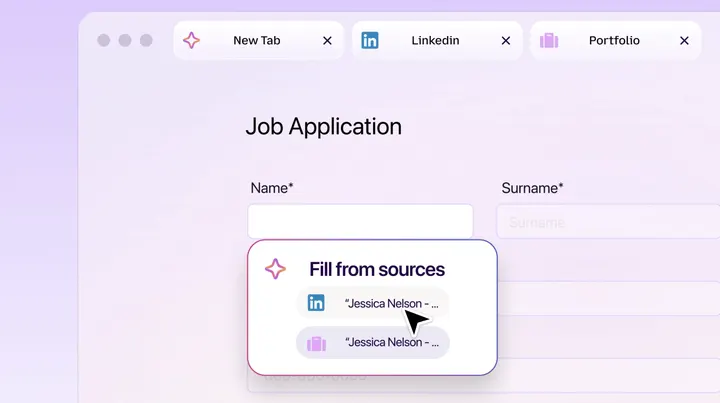
مایکروسافت و موزیلا قابلیتهای جدیدی را به محیط مرور هوشمند فایرفاکس اضافه کردهاند که شامل پر کردن خودکار فرمها بر اساس تبهای باز و پایش صفحات وب برای رصد تغییرات میشود.
موزیلا مرورگر خود را با قابلیتهای جدیدی در بخش Smart Window بهروزرسانی کرده است که به کاربران در تکمیل فرمهای آنلاین کمک میکند. این ویژگی جدید میتواند اطلاعات موجود در تبهای باز کاربر، مانند پروفایل آنلاین یا صفحه لینکدین را استخراج کرده و در فرمهای درخواست کار جایگذاری کند.
برای استفاده از این قابلیت، کاربران میتوانند در فرمهای دارای فیلدهای متنی گزینه Fill from sources را انتخاب کنند تا فایرفاکس پیشنهادهای مبتنی بر هوش مصنوعی را بر اساس تبهای انتخابی ارائه دهد. مدل هوش مصنوعی Gemini 3.1 Flash Lite گوگل وظیفه تولید این پیشنهادها را بر عهده دارد.
علاوه بر این، کاربران اکنون میتوانند از فایرفاکس بخواهند صفحات وب خاصی را برای تخفیفها یا آگهیهای شغلی پایش کند. این ویژگیها در حال حاضر به صورت نسخه بتا روی دسکتاپ در ایالات متحده و کانادا عرضه شدهاند و در ماههای آینده در سایر کشورها نیز در دسترس قرار خواهند گرفت.
Firefox’s Smart Window adds AI form filling and webpage monitoring
Mozilla is updating Smart Window - Firefox's AI-powered browsing experience - with a new feature that can help you fill out online forms based on your open tabs. As an example, Mozilla says Smart Window can pull information from your online portfolio or LinkedIn page to paste your work history into a job application. You
Mozilla is updating Smart Window — Firefox’s AI-powered browsing experience — with a new feature that can help you fill out online forms based on your open tabs. As an example, Mozilla says Smart Window can pull information from your online portfolio or LinkedIn page to paste your work history into a job application.
Firefox’s Smart Window adds AI form filling and webpage monitoring
An update to Firefox’s AI browsing experience can draw from your open tabs to help you fill out forms.
You can try out this feature by clicking into a form with at least four text fields. From there, you’ll see an option to “Fill from sources,” which will show all of the tabs Firefox will draw from. You can then select or deselect tabs that you want Firefox to use, and the browser will generate suggestions based on the information in them. This feature currently supports text fields on web forms, but Mozilla is working to add support for dropdown menus and PDFs. Mozilla notes that data from your source pages is shared with Google’s Gemini 3.1 Flash Lite, the AI model that generates the text suggestions.
Along with this update, you can now ask Firefox’s Smart Window to watch a certain webpage for sales, new job listings, and other updates. You can set up a task by typing “/watch” in the Smart Window chat, describing what you’re looking for, and adding the webpages you want to watch. Firefox can then check for updates on a daily or weekly basis, but only when the browser is open.
When Firefox detects the change you’re looking for, it will send you a notification through the Tasks button on the toolbar, or on your desktop (if you have desktop notifications enabled). Firefox will pause watching for updates if it doesn’t detect a change after 60 days, before stopping them completely after 90 days.
These two features are rolling out to the Smart Window beta on desktop in the US and Canada. They’ll be available in other countries in the “coming months.”
Source report: The Verge AI.
گزارش فارسی این خبر با کمک هوش مصنوعی و فقط بر اساس اطلاعات منتشرشده در منبع تهیه شده است.