Developer builds a complete Intel 486 PC emulator in a browser — 100% pure-JavaScript Retro486 includes modular tabs for screen, motherboard, storage, expansion cards, and more
Developer Jan de Jager has created a full Intel 486 PC system in a browser. On the e486-web GitHub page , de Jager boasts that the emulator is coded in 100% pure JavaScript. The project’s fuller title is the Retro486 Modular Browser PC . Claude gets a development credit, so we guess you could say e486-web was (partially) vibe-coded . The live demo you can boot with a single click is impressive, with tabs to interact…
Developer builds a complete Intel 486 PC emulator in a browser — 100% pure-JavaScript Retro486 includes modular tabs for screen, motherboard, storage, expansion cards, and more
There’s FreeDOS and classic games like Doom ready to play around with, or you can use your own disk images.
Developer Jan de Jager has created a full Intel 486 PC system in a browser. On the e486-web GitHub page, de Jager boasts that the emulator is coded in 100% pure JavaScript. The project’s fuller title is the Retro486 Modular Browser PC. Claude gets a development credit, so we guess you could say e486-web was (partially) vibe-coded.
The live demo you can boot with a single click is impressive, with tabs to interact with and configure your browser-based, dependency-free Intel 80486DX2-66 PC in a browser. The first tab is dubbed the CRT monitor, and this is where you will spend the most time using the command line, apps, and games. However, it is also very appealing to be able to adjust your PC configuration in the tabs for Motherboard & Slots, Storage Bay, Custom Card Studio, and System & Diagnostics.
I couldn’t resist taking the e486-web for a spin using the live demo. The CRT monitor screen is totally charming, with various display options including color and scanlines, and tributes to classic CRTs with green phosphor, amber, or paperwhite displays. This is the screen where you will also type DOS commands and interact with whatever you get to run.
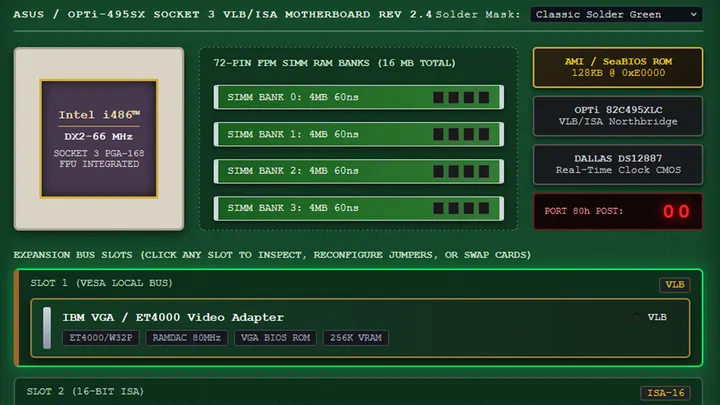
The next tab in this comprehensive 486 PC system emulator lets you pick a motherboard design and, probably more importantly, add and remove expansion cards. The default system comes with a VLB graphics card, Sound Blaster 16 ISA card, a multi-I/O controller, network card, and more. All the cards seem to be configurable. A Custom Card Studio tab lets you create and test more cards, and it looks quite advanced.
I spent quite a lot of time in the Storage Bay tab, switching through the OS and software disks inside the “1-Click bundled & Cached Disks” collection. FreeDOS started fine, but I got some errors when I wanted to test some of the games in the library, which includes Doom, Wolfenstein 3D, and more. Though tempted to find and install Syndicate on the hard disk that the emulator can create and configure, I didn't get around to it yet. However, the Bullfrog classic is one of the first games I played on an actual 486DX2 system in the 1990s, and I also played it on Amiga. This browser-based emulator features browser persistence, so e486-web settings can be maintained between sessions, and it automatically caches ROMs, floppy images, and custom uploaded .img/.iso files for your convenience.
Another tab in this extensive system emulator is called System & Diagnostics. Here you can switch the CPU to a different model, view the CPU registers, and nose around in RAM, VRAM, storage, BIOS, boot sectors, and so on.
Currently e486-web is in version 0.1, and the GitHub shows that most files were uploaded/updated about a week ago. Some files are just two days old, though, so hopefully wrinkles are busily being ironed out by de Jager and Claude. The presentation of this no-downloads live emulator, and the conveniently tabbed interface and configuration options, show lots of promise.
Get Tom's Hardware's best news and in-depth reviews, straight to your inbox.
Follow Tom's Hardware on Google News, or add us as a preferred source, to get our latest news, analysis, & reviews in your feeds.
Mark Tyson is a news editor at Tom's Hardware. He enjoys covering the full breadth of PC tech; from business and semiconductor design to products approaching the edge of reason.